Updated November 2026
The ManageWP alternative for agencies that sell security
ManageWP is a solid free dashboard for updates, backups and one-click logins. If that's all you need, it's a fine choice. When clients start asking "are we safe?", you need more than an alert. ManageWP's own page says its Security Check "is a messenger, not a cleaner".
At a glance
The short version of the table below.
| ManageWP | VettedWP | |
|---|---|---|
| Vulnerabilities ranked by risk | ManageWPSecurity Check alerts; automatic checks $1/site | VettedWPRanked by exploit risk, included |
| Rollback and re-scan after a fix | ManageWPFixing is an update you run | VettedWPRollback point, staged rollout, re-scan |
| Verified backups | ManageWPCloud backups, $2/site add-on | VettedWPEvery backup checked, every plan |
| Client reports | ManageWPTemplates; colors and order premium | VettedWPDrag-and-drop, 10 templates, portal |
| Price at 25 sites | ManageWPFree core, then $25–$50/month per paid add-on | VettedWP$61.25/month on Business, all of the above |
ManageWP facts from its pricing page. Recheck them there.
ManageWP and VettedWP, side by side
| ManageWP | VettedWP | |
|---|---|---|
| Vulnerability detection | Security Check for malware, blacklist and vulnerabilities; automatic checks are a $1/site add-on | CVEs matched to installed versions, enriched with NVD, CISA KEV and EPSS, ranked by exploit risk, included |
| Fixing | Alerts you | Patch with rollback, staged rollout, re-scan to check the fix |
| Deeper testing | Security Check only | Active scan, pen test, attack surface, code analysis |
| Backups | Cloud backups ($2/site premium) | Every backup verified (downloaded, decrypted, checked), on every plan |
| Client reports | Templates, logo, intro; colors and section order in premium | Drag-and-drop builder, 10 templates, client portal |
| Pricing model | Free core, then $1–$2/site per add-on, or $150/month for 100 sites | One per-site price, falling with volume: see pricing |
| Plugin security | Worker plugin | Plugin holds only a public key; signed both ways |
ManageWP facts from its pricing page and Security Check page. Recheck them there before you decide.
ManageWP's 21 tools, and where each one is in VettedWP
19 of the 21 tools on ManageWP's features page have a match here. VettedWP also has 30 tools that are not on that list: see them all.
| ManageWP tool | In VettedWP |
|---|---|
| Backup | Yes: Verified backups, Backup verification, Restore and rollback |
| Clone & Migrate | Yes: Clone, migrate and one-click staging |
| Uptime Monitor | Yes: Uptime monitoring |
| Safe Updates | Yes: Safe updates and Autopilot, Visual check |
| Security Check | Yes: Malware scanning and recovery, Security overview |
| Performance Check | Yes: Performance and Core Web Vitals, Database clean-up |
| Client Report | Yes: Client reports |
| White Label | Yes: White-label |
| Google Analytics | Yes: Google Analytics |
| Maintenance Mode | Yes: Maintenance mode |
| Code Snippets | Yes: Code snippets |
| SEO Ranking | Yes: SEO rank tracking |
| 2FA | Yes: Passkeys and two-factor sign-in, Two-factor and login protection |
| 1-click Login | Yes: One-click login |
| Manage Comments | Yes: Comments and spam protection |
| Local Sync | Not built. Syncing a local copy with a live site is a niche need, ManageWP lists it as a beta, and clone and staging cover moving a site between copies. |
| Manage Updates, Plugins & Themes | Yes: Plugins and themes, Bulk changes |
| Vulnerability Protection | Yes: Vulnerability scanner, Cloudflare edge protection. Their attack blocking is automatic; our Cloudflare rules are ones you add, after a preview. |
| Collaborate | Yes: Team and per-site access, Client portal |
| Template Builder | Not built. A new site can start as a clone of one you already look after. |
| Link Monitor | Yes: Broken link monitor |
ManageWP's tools as listed on its features page, checked 14-11-2026. ManageWP is a trademark of its owner; we are not affiliated with it.
What changes when you switch
With ManageWP
- Security Check alerts you; automatic checks are a $1/site add-on
- Fixing is an update you run yourself
- Cloud backups are a $2/site premium add-on
- Report colors and section order are premium
With VettedWP
- CVEs matched to installed versions and ranked by exploit risk, included
- Patch with a rollback point, a staged rollout and a re-scan
- Every backup verified after it runs, on every plan
- A drag-and-drop report builder with 10 templates
What changes day to day
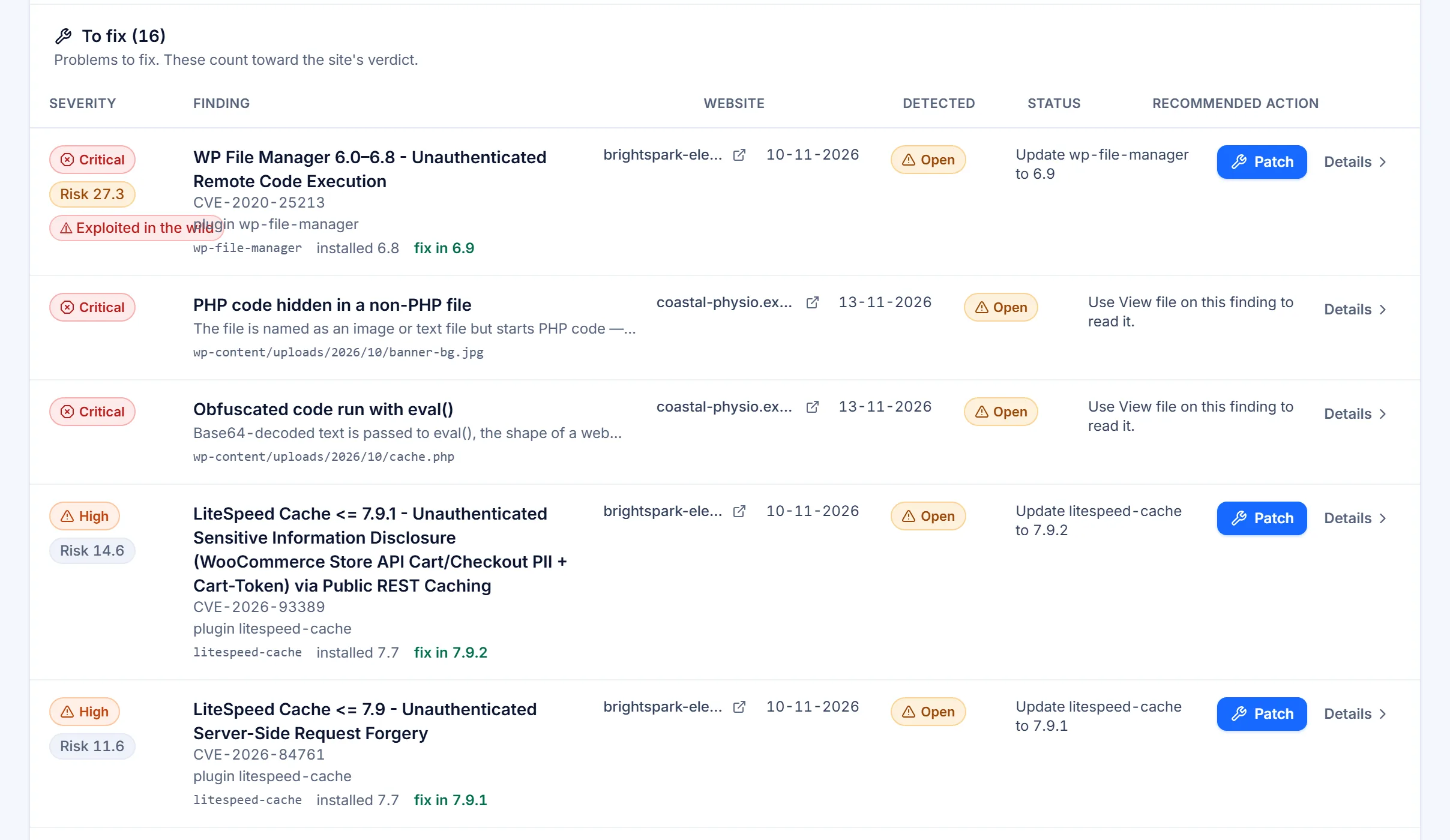
One list, ranked by risk
Findings from every site in one list, ordered by severity, exploit activity, the access an attacker needs and whether the plugin is active. A known-exploited vulnerability in an active plugin is marked Blocked.
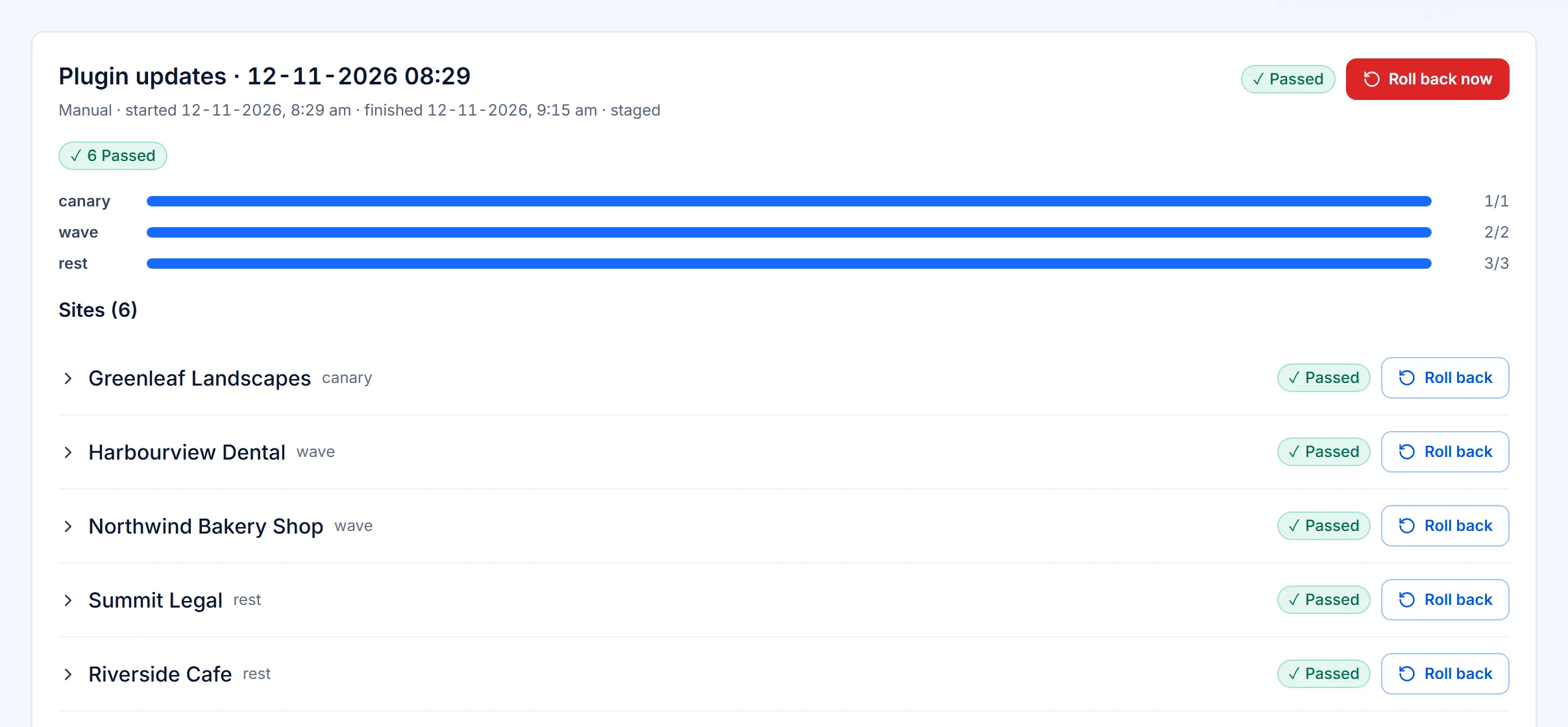
A fix you can undo
Every update takes a rollback point first and goes out to one site, then a wave, then the rest. After a security patch we apply, the site is scanned again and the result kept.
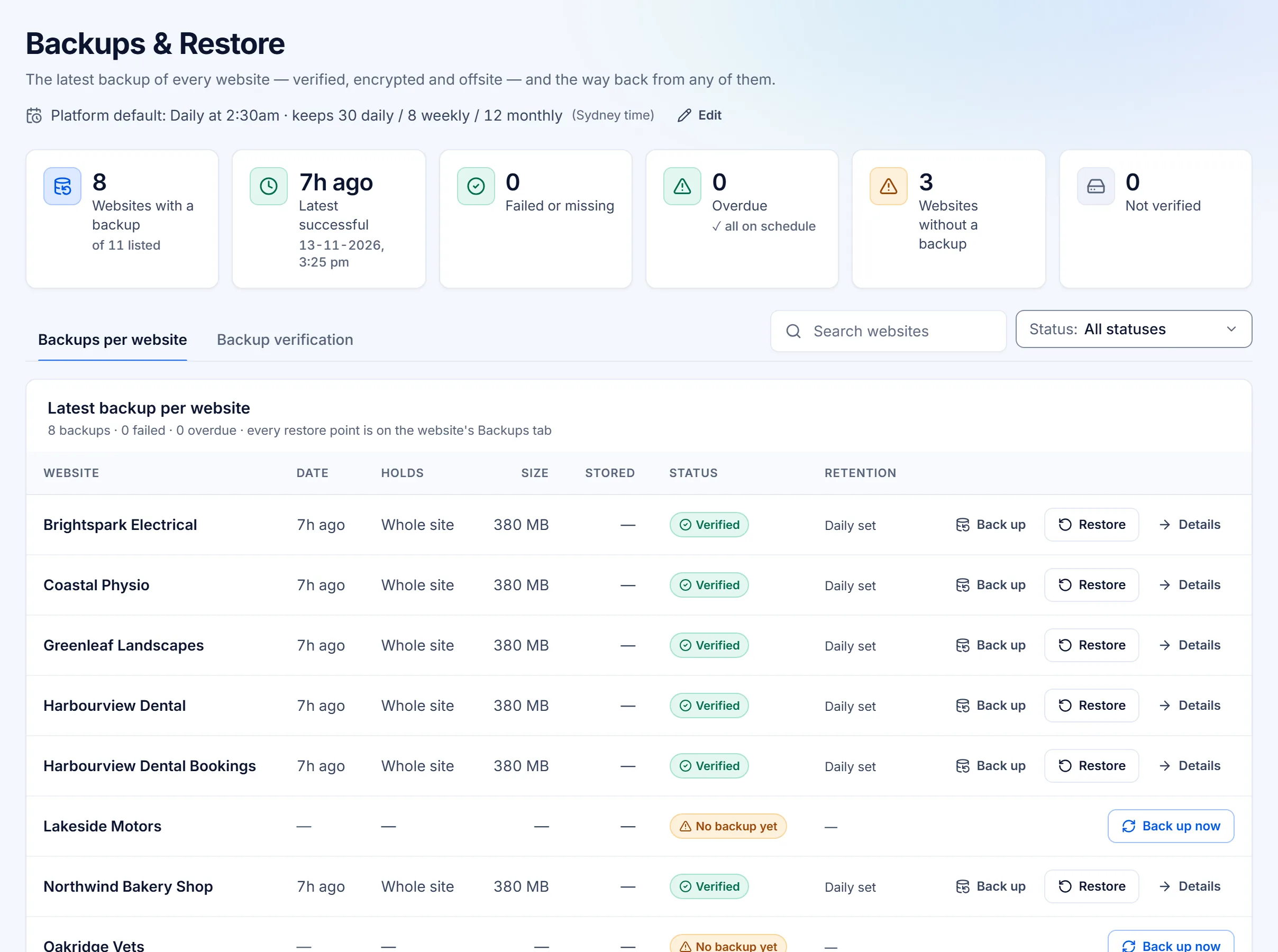
Verified backups
Encrypted before they leave the server, offsite and incremental, on every plan. Each one is verified after it runs: every stored piece downloaded, decrypted and checked.
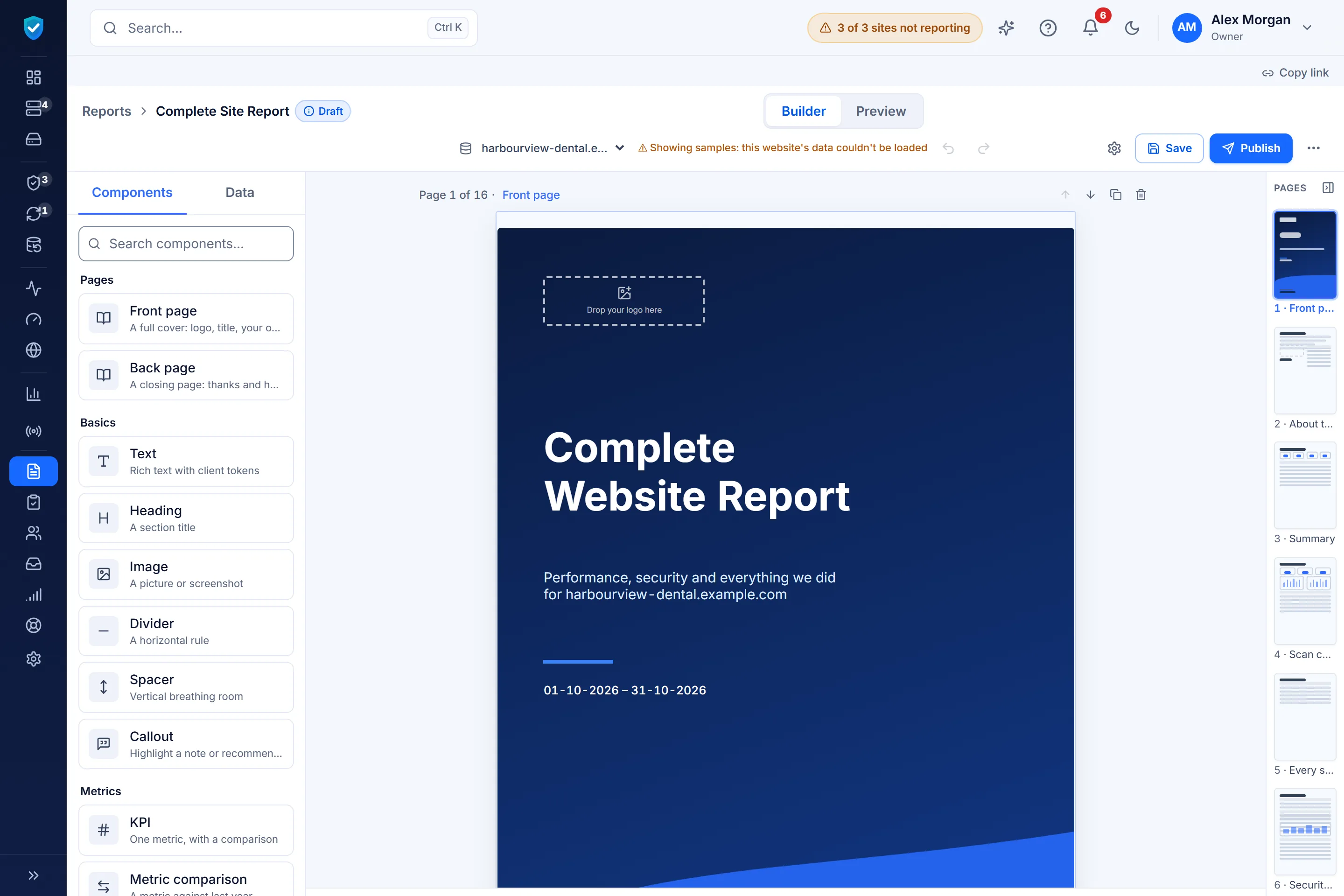
Reports you build
A drag-and-drop builder with 10 templates, report links that expire or take a password, and a portal login for each client.
What it costs at your size
VettedWP has one per-site price that falls as you add sites. On Business it is $29.75 a month for 10 sites, $106.25 for 50 and $196.25 for 100, with vulnerability patching, backups, monitoring and client reports included. ManageWP's core is free, and each paid add-on is $1–$2 per site a month, or $150 a month for its bundle of up to 100 sites. If you only use the free core, ManageWP costs less. If you pay for several add-ons, add them up before you compare.
What VettedWP costs
Per month, from the price list on the pricing page.
- 10 sites, on Business$29.75 /month
- 25 sites, on Business$61.25 /month
- 50 sites, on Business$106.25 /month
- 100 sites, on Business$196.25 /month
Switching from ManageWP is one import
Export your site list from ManageWP, save it as a CSV with name and URL columns, and import it in one step. We list anything we couldn't import, with the reason.
- One import step
- Failures listed, never dropped
- Run both side by side
When ManageWP is the better choice
If you manage a handful of personal sites and only need free updates and monthly backups, ManageWP's free plan costs less.
You want a free plan
We don't have one: the smallest plan is Solo, $9 a month for one site.
Your clients never ask about security
If nobody asks "are we safe?", the vulnerability work here is effort nobody will pay you for.
You'd rather not switch
Each site needs our plugin installed, and backups and history start fresh. If ManageWP does the job, staying is a reasonable answer.
Can I run ManageWP and VettedWP side by side?
Yes. Running both for a month while you compare is a reasonable plan, and nothing in VettedWP prevents it. Remove ManageWP's Worker plugin from a site once you no longer need it.
What does the import bring across?
Your site list: a name and a URL for each site, from a CSV. Anything we can't import is listed with the reason. Backup history, notes and past reports stay in ManageWP; here they start fresh once each site is connected.
Do I have to give you WordPress admin passwords?
No. Each site runs our plugin, which holds only our public key, and the channel uses signatures, not passwords. No WordPress admin password is ever stored.
Is there one-click login, like ManageWP's?
Yes, on every plan. Each magic login link works once and expires within five minutes.
Is there a free plan?
No. The trial gives you every Business feature for 14 days on up to 5 sites; cancel before it ends and you pay nothing. After that, the smallest plan is Solo: one site for $9 a month.
Where do the ManageWP facts on this page come from?
From ManageWP's own pricing and Security Check pages, linked above, checked in November 2026. Prices change, so recheck them there before you decide.
Try it on your own sites
Import your ManageWP sites free for 14 days.
14 days of every Business feature on up to 5 sites. Cancel before it ends and you pay nothing.